
Robert Greenleaf
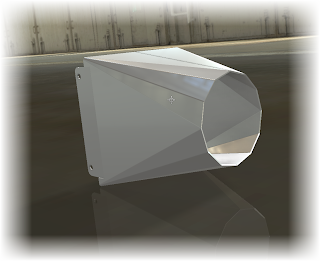 |
| Here's what we're going to export |
Every once in a while the export of sheet metal flat patterns comes up, and how best to export the flat pattern.
One way I really like is directly exporting from the part file, primarily because it gives you several options to adjust how your file is exported. One often overlooked method is to save the settings in an *.ini file.
Here's a video showing how you can export to a *.dxf from the Inventor part file. And don't forget to make sure those unfold rules are set up correctly!
Video & Screen Capture created using Snagit & Camtasia by Techsmith
SpacePilot Pro by 3DConnexion used to navigate model


Jonathan, please help
ReplyDeleteI want my contour roll in my assembly on my dwg sheet (for CNC) but flat not rolled.. the CNC guy doesn't need rolled dims...you know. I want my flat pattern dims to change on my dwg sheet when the model changes. Is this possible?
It sounds like you want to place the flat pattern view on the drawing.
DeleteWhen placing a Sheet Metal View on the drawing, make sure to choose "flat pattern view" as the option .
You'll have to have a flat pattern generated in the model, or else the button will be grayed out.
There's a link on how to do that here:
http://knowledge.autodesk.com/support/inventor-products/learn-explore/caas/CloudHelp/cloudhelp/2014/ENU/Inventor/files/GUID-DB6CEFCE-62B8-49F1-BF12-1DD9FEA48B60-htm.html
Good luck!
Wow that was easy, the next question will be worth your time...You're the Man Jonathan!
DeleteGlad to help! Sometimes it's just knowing where to look! :)
ReplyDeleteJonathan,
ReplyDeleteI am now at the point where I am trying to understand file management, ie project files vs Vault. If you didn't notice I am self taught. Can you refer me to one of your posts? I use skeleton sketches to create assemblies, and am having a hard time linking and creating new assemblies properly.
Thank you for your time!
I'm afraid I haven't written anything myself on Vault vs. Project files, but this might give you a start. It's a nice document written for Autodesk university.
Deletehttp://forums.augi.com/showthread.php?149491-MA401-1-Autodesk%C2%AE-Inventor-Project-Files-Revisited
You might also check out the link at my post here: http://www.inventortales.com/2015/03/ketiv-introduces-autodesk-vault-diy-kit.html
It's a new Vault DIY kit that one of my colleagues created. It gets into a lot of detail about Vault.
I forgot to mention we don't have vault. Is vault a must have?
ReplyDeleteI wouldn't call it a "must have", but I would call it a very nice to have. If you're going to set up using the project method, I would make sure that everything is within the project search paths (workspace, workgroup, or library), and that all filenames are unique.
DeleteIf you don't have unique filenames, there's a chance that Inventor will grab a different part with the same name when opening an assembly, which will of course mess things up.
The project doc is a good document for that. :)
Thanks Jonathan!
ReplyDeleteIs there a capability in Inventor to link sheet numbers and Rev #s to a single drawing list? Or any ideas on how to use a table in that way?
I'm not sure what you mean when you say "Drawing List". Are you referring to the set of drawing sheets?
DeleteYes, in my drawing set showing multiple assemblies (20+ sheets) I would like to make a Dwg list ...a table of contents...and link sheet and Rev #s to the Dwg list.
ReplyDeleteI don't know that one, at least off the top of my head. That might be a good one for the Inventor Discussion Groups.
DeleteOk, I'll check that out. I got another question this one I'm sure is easy but ..I just cant get my chain to connect to my post. I followed the 2 youtube videos on how to make the chain using imates, I made the chain flexible in my asm..but I keep getting an error message when I make the second constraint saying that the first constraint(at end of chain I am using half links) conflicts with the second (other end)....what should be the correct constraints..or what am I not doing? Thank you for your time again Jonathan
ReplyDeleteI assume it's a length of chain links? if so, I would think about using a sketch. Place a line with a point constrained to the point of contact. You can use two of these with a mate point to get the motion pretty close.
DeleteChain links can be a little tricky. Here's a couple of other link sthat might help you .
https://www.youtube.com/watch?v=lmU7okhv0W8
http://forums.autodesk.com/autodesk/attachments/autodesk/78/375667/1/Animated%20Chain.pdf
Thanks, Jonathan.
ReplyDeleteI am also wondering if there is a way to lock views in a dwg?...ie. we are building tanks and for example I have a view of the ladder for my ladder page, and I have the ladder on a tank plan page. If I change the angle where the ladder was placed on the tank(tank plan page), can I get the ladder page to not change, to get the ladder page view to follow where the ladder was moved to (in the tank plan page) so the view is the same (in the ladder page) and I don't have to re-do my ladder page. Thank you again for your time and patience.
If I understand correctly, you want to freeze the drawing so it won't reflect updates made in the associated assembly? (Not sure I follow completely).
DeleteAssuming I haven't misunderstood, I would have to say the answer is no. You'll have to create a new assembly, and drawing to reflect the different states of the drawing.
I wrote a post a ways back on changing the view associated to a drawing here: It might help.
http://www.inventortales.com/2010/09/change-model-reference-making-switch.html
I had a feeling about that... Thanks again for your time Sir.
ReplyDeleteGlad to help. Take care! :)
Delete